
Cedric Delsaux is a photographer that is famous for his Star Wars series and his latest portrays Star Wars characters in urban environments. Really cool stuff, follow the link to see some more pictures. [Pictures]
via
 2:48AM - Entertaining Kuwait since 2003
I’ve always wanted an Apple TV but I couldn’t find a use for it. I had XBMC (xbox media center) running on my old Xbox and it was doing more than fine. I’ve already posted before on how XBMC is the best media center software in the market and Apple TV really stood no chance to compete… until now. Ten days ago a hack was released that would allow the installation of XBMC on the Apple TV. It’s a very simple process, you just install the hack onto a usb memory stick, plug the stick behind the Apple TV and just reboot. It then takes around 30 seconds to install XBMC and thats it.
What are the advantages of XBMC on Apple TV over XBMC on the original Xbox?
1) Apple TV is quieter since it doesn’t contain a loud fan like on the Xbox
2) Connects via HDMI or Component cable while XBMC is only component
3) Can play 720P movies while XBMC can’t
4) The interface is snappier since Apple TV is a faster machine
5) It looks better and takes up much less space
6) Integrates with iTunes on my main server
I am so satisfied with Apple TV now that I’ve already unplugged my old Xbox and placed it in storage. If you don’t have an Apple TV Amazon sells them for KD60. Here is the [Link]

If you’re interested in setting up XBMC on Apple TV here is the guide I used. [Link]
In case you didn’t know already, XBMC is a media center software that will allow you to stream practically any movie format from your main server. Also as a side note, the right arrow key on my MacBook just stopped working awhile ago, I think its a sign I need to get the new MacBook.
Update: If you want to try out XBMC its also available for Windows, Mac’s and Linux. [Download]
Note: XBMC does NOT run on the Xbox 360, it only runs on the original Xbox.

I installed Mac OS X on my MSI Wind today and its running perfectly! The installation went very smooth and everything is working fine including the wifi, webcam, bluetooth, ethernet port and sound. I really didn’t think OS X would run so well on the Wind, I love it! I am actually so happy with the Wind now I am going to be selling my Asus Eee 900. I tried installing OS X on it today also but it was running really slow so I just went ahead and installed the dreadful Windows XP. Its running much better but I prefer OS X over XP any day so thats why I am going to be sell it. I will be losing money on it since the price of it has dropped since I got it but since I got the MSI Wind for free I don’t mind. The thing is I really don’t have the need for two ultra portables in my life and the fact that the Wind is running OS X means I will always choose it over my Asus.

If anyone is interested in installing OS X on the Wind all you need to get it working right is a Dell wifi card. I purchased the Dell 1490 from eBay for $15 with shipping.
Update: My Asus Eee 900 is now listed for sale in the forum [Link]
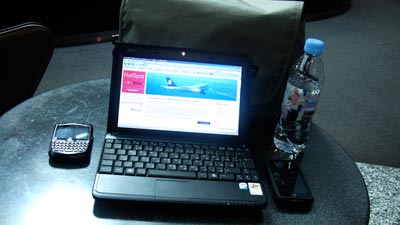
I took my MSI Wind to Munich with me as my travel laptop and it turned out to be a really practical alternative to lugging my MacBook around. Its much more lighter than my MacBook and its also thinner and smaller so it fit easily into my small carry on travel bag and it also wasn’t a pain to carry around. My biggest problem with the Wind is the fact that it runs Windows XP which I hate.
That problem is going to get solved very soon though. It turns out I can install Apple’s Mac OS X onto it which is what I am going to be doing very soon. I ordered a new Dell wifi card from eBay for $15 with shipping to replace the standard one that comes with the MSI Wind. The Dell wifi card works with OSX while the standard card doesn’t. I am also going to be upgrading the battery to a 6-cell which will make it last twice as long. Finally I am going to be upgrading the RAM from 1GB to 2GB, not because I really need to but because it costs only KD7 to do. I am now just waiting for the wifi card to arrive in the mail and once it does I will do the install and post my feedback on how the MSI Wind runs with OSX.
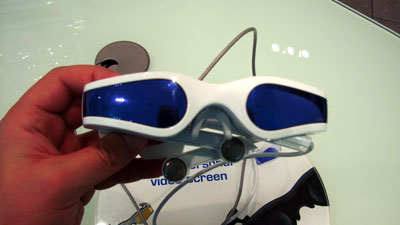
I passed by an Apple retailer in Munich today to check and see if by any chance they had the new iPod’s in stock. Turns out they will get them at the end of the week which sucks for me since I would be back in Kuwait. While at the store I spotted the Cinemizer which I posted about back in May. There was a working display model which I got to play around with. Watching a video through the glasses felt like I was sitting in a dark room with a large TV in front of me which was pretty cool. The glasses were comfortable to wear and I think it would a lot more practical watching a movie with these glasses then off my tiny iPod screen. But I think I looked really weird standing in the store with these glasses on. Imagine the reaction you would get from strangers if you wore your sunglasses while on the plane. Now imagine the reaction you would get wearing these thick ugly frames with wires running out of them… [Link]

Ok this post is a bit geeky but I just found it too unbelievable not to post. The site contains this crazy zip file thats only 42KB in size but when expanded uncompresses to 4.5 petabytes! [Link]
1 petabyte = 1000 terabyte

Simply the best video game ever! [Link]
I have an old PIII 500 with 256MB of RAM and a 20GB hard drive lying around which I wanted to give to someone. I didn’t want to install Windows on it since the person isn’t very good with computers and always ends up getting viruses and trojans installed on his system. The computer was going to be used for Internet browsing, chatting on MSN and Yahoo and copying and view pictures from his digital camera. I decided to install a Linux OS.

The first Linux OS I installed was the latest version of gOS which was released two days ago. From the screen shots it looked like a really friendly and easy to us version of Linux and thats what I was looking for. After installing it I realized that the operating system was running very sluggishly on this really old computer, it wasn’t going to work.
I then remember I had bookmarked a website from Digg which had a list of Linux distros that were meant to be run on really old computers. I went through the list, did some research and in the end decided to try two different ones, TinyFlux and Wolvix.
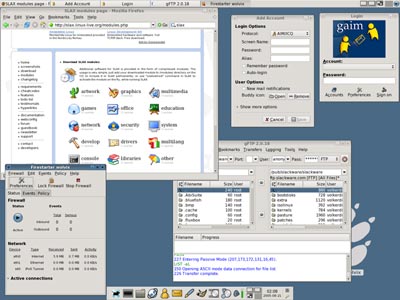
I tried TinyFlux first and although it ran really well the user interface wasn’t very friendly. I then decided to try Wolvix and not only did it perform really well but the interface was fairly friendly looking with a Mac like dock at the bottom and large friendly icons everywhere. I decided to stick with Wolvix and after playing with it for an hour I think its pretty impressive for an OS thats under 250MB in size. It has Firefox, a music player, video player, photo viewer, and a whole bunch of other softwares all included and there is a ton more I can download all for free.
This is actually the best part of Linux, its free and the majority of the software for it is free. Another good thing is you can try out the OS without installing it, you just run it straight from the CD and if you like it you can install it if not you just eject the cd, reboot and you are back to your old operating system.
If you want to check out the list of Linux distros for old computer click [Here]
For gOS click [Here]
and for Wolvix click [Here]
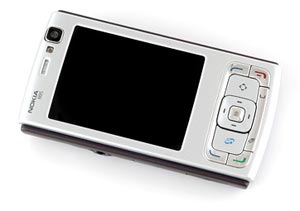
This is a cool software that works on some Nokia phones. Say you get a phone call while in a meeting, all you need to do is flip your phone over and it will give the caller a busy tone and put your phone on silent. You could also just put your phone on silent by flipping your phone over anytime and taking silence off by flipping it back. Currently only works on the N95, N95 8GB, N93i and N82. [Link]
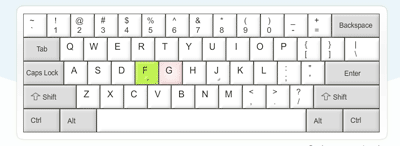
A cool flash based typing app that calculates how fast you type. When I was in university I hit 70wpm in my touch typing class, I wonder how I would compare now. [Link]

update: I just hit 66wpm but I am lying down on my couch watching Rush Hour 3 (which sucks btw) and typing on my unconventional MacBook keyboard. I am sure I could easily hit 70+ while sitting at my desk typing on a regular keyboard.

As I mentioned before I am currently upgrading the sound system in my Wrangler. I already received and installed the head unit which I have to say is incredible. I installed the Alpine iDA-X001 which is made for the iPod and its extremely practical and easy to use. I am really glad I went for it, absolutely no regrets and would recommend it to anyone who is looking for a new head unit.

For the speakers and amp I was planning on going with JL Audio but I wasn’t able to find a combination that fit my budget. Also the JL Audio amps are pretty big and I wanted something I could fit under the drivers seat. In the end I decided to go with Boston Acoustics SX55 for the front and rear with an Alpine MRP-F250 amp under my drivers seat. I already ordered these items and I should be getting them next week.

For the subwoofer I decided to go with an Infinity BassLink II. I use the trunk of the Wrangler for my dog every time I take him out so I don’t have room for a large sub enclosure neither do I have room to install an amp. I decided to go with the BassLink II since as you can see in the picture above, it won’t take up much room in the trunk and it has a built in 250watt RMS amp which makes it all very compact. I could get my dog in and out of the Wrangler without even having to remove the sub which is really practical.
All thats left now is the installation which I have decided to do myself. I already have a step by step guide with pictures on what I need to do and so far the only hard part seems to be the removal of the drivers seat so I could install the amp under it. The reason I want to do the installation myself is because I want to learn how to do it plus the fact that it should be fun. I will be sure to post pictures of the installation once I am done.

AOL just announced that they will be killing the Netscape Navigator browser on February 1st 2008. Its hard to understand how AOL were able to run an extremely popular browser like Navigator into the ground while less popular browsers like Opera and OmniWeb are still surviving. Anyway if you feel nostalgic here is a link to nearly all the versions of Netscape Navigator ever made for any system starting all the way from version 0.4. [Link]
A guy “upgraded” his computer from Windows Vista to Windows XP and then wrote a review. I found it pretty funny. [Link]
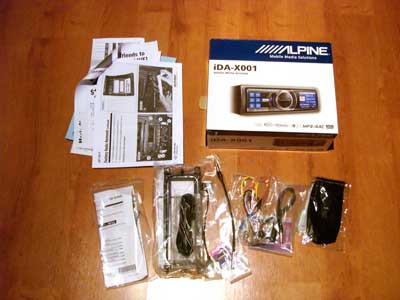
Today morning I got a surprise delivery, my stereo which had shipped from the US 3 days ago with U Shop We Ship had already arrived to Kuwait and cleared customs. It was my first time ordering from Crutchfield and I have to say they really are the best for purchasing car audio equipment from. With my Alpine iDA-X001 head unit they also provided me with everything I needed to install it into my Wrangler by myself including a face plate, wiring harness, antenna adapter and a step by step installation guide with pictures of my Jeep.

I took both the Alpine wiring harness and the one that Crutchfield sent to connect it to my Jeep to a store in Hawalli to have them solder it together. Its a pretty easy job of just connecting wires of the same color together but I didn’t have a soldering iron so I let them do it for me. After having them solder the wiring harnesses together I went back home and took apart my Jeep’s dashboard and installed the head unit myself. It took me less than 30 minutes to have it up and running. This is what I love about the Wrangler, its such a simple car, I seriously think I could take it all apart using just a philips screwdriver.
The Alpine unit doesn’t play CD’s or tapes, it just connects to the iPod and from what I have seen so far it does an amazing job of it. I will post a full review after I try it out for a while but so far it looks like its going to be a positive one.
If anyone is planning on buying something from Crutchfield use the coupon code: p9w3q-2y6hc-2dssw
It will give you a $20 discount and I get a $20 credit.
Note to Wrangler owners: If you want the factory sub to work then you need to connect the Blue/White cable (Remote Turn-On) to the Blue cable instead of Blue to Blue. The Blue cable is for Power Antenna and so powers the sub only when you are tuned into the radio. The Blue/White cable sends power constantly so the factory sub will be powered when tuned into the radio AND when connected to the iPod or listening to a CD or whatever. This applies when installing any head unit not just the Alpine.

Like Wikipedia except for the weather. [Link]