
A guy “upgraded” his computer from Windows Vista to Windows XP and then wrote a review. I found it pretty funny. [Link]
Category: Geek
Categories
My new car stereo
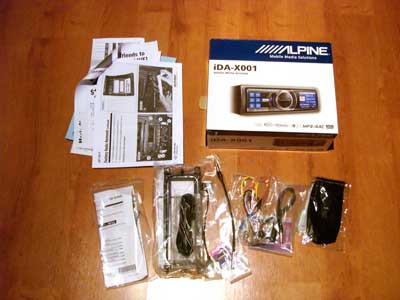
Today morning I got a surprise delivery, my stereo which had shipped from the US 3 days ago with U Shop We Ship had already arrived to Kuwait and cleared customs. It was my first time ordering from Crutchfield and I have to say they really are the best for purchasing car audio equipment from. With my Alpine iDA-X001 head unit they also provided me with everything I needed to install it into my Wrangler by myself including a face plate, wiring harness, antenna adapter and a step by step installation guide with pictures of my Jeep.

I took both the Alpine wiring harness and the one that Crutchfield sent to connect it to my Jeep to a store in Hawalli to have them solder it together. Its a pretty easy job of just connecting wires of the same color together but I didn’t have a soldering iron so I let them do it for me. After having them solder the wiring harnesses together I went back home and took apart my Jeep’s dashboard and installed the head unit myself. It took me less than 30 minutes to have it up and running. This is what I love about the Wrangler, its such a simple car, I seriously think I could take it all apart using just a philips screwdriver.
The Alpine unit doesn’t play CD’s or tapes, it just connects to the iPod and from what I have seen so far it does an amazing job of it. I will post a full review after I try it out for a while but so far it looks like its going to be a positive one.
If anyone is planning on buying something from Crutchfield use the coupon code: p9w3q-2y6hc-2dssw
It will give you a $20 discount and I get a $20 credit.
Note to Wrangler owners: If you want the factory sub to work then you need to connect the Blue/White cable (Remote Turn-On) to the Blue cable instead of Blue to Blue. The Blue cable is for Power Antenna and so powers the sub only when you are tuned into the radio. The Blue/White cable sends power constantly so the factory sub will be powered when tuned into the radio AND when connected to the iPod or listening to a CD or whatever. This applies when installing any head unit not just the Alpine.

Like Wikipedia except for the weather. [Link]

ZDistrict came to my office a while back and sat behind my desk and asked
Where is your computer
I dont have one I replied.
He had the look of bewilderment.
I am here to think, not to work.
More confusion from ZDistrict (He was actually speechless).
Categories
Halo 3 at Night

Lately I been playing lots of Halo 3 and been staring at that image as I wait for my games to load. It really astonished me since I am very familiar with the picture the world at night showing the world’s continents lit up.

Yet on Halo 3 Africa and South America are dark spots with a dots compared to the rest of the world.
It reminded me of my post Google Per Capita on how many people have access to Google. Yet the Halo Per Capita is even more telling. Just a quick glance of the map you can see which countries have access to high speed internet and disposable income to pay for a XBox.
Update: The lights on Halo3 map lighting up on the day of the game’s launch


A friend of mine passed me his two iPhones today to unlock. He purchased them around the same time I purchased my last iPhone except his arrived with the 1.1.1 firmware while mine luckily arrived with the 1.0.2 one. Yesterday an updated version of AnySIM got released which I posted about and which supposedly unlocked the 1.1.1 iPhones but I tried it and it didn’t work.
The steps to unlocking a 1.1.1 iPhone are fairly easy, its just one tiny extra step compared to unlocking the 1.0.2 phones.
1) I downloaded the latest version of INdependence
2) I ran it and clicked on the option to Enter DFU mode (this is the option that you didn’t have to do with 1.0.2)
3) I quit INdependence, ran iTunes and restored the phone to version 1.0.2
4) I quit iTunes and ran INdependence again
5) I clicked on Activate
6) I then clicked on Jailbreak
7) I then clicked on install SSH
8) I FTP’ed to the phone and copied AnySIM
9) I ran AnySIM
Thats all the steps required to activate and unlock the iPhone. I also installed AppTapp but that can be done later. Now my issue is everything went smoothly except for the AnySIM unlock. It ran and gave me an error at the end which is normal, but when I rebooted it still wouldn’t work with the local GSM network. I tried unlocking both iPhones and had the same issue. Everything else on the iPhone works except for the phone. I don’t know if this is happening with other people or if I missed a step somewhere but whatever the reason might be it’s too late at night to figure it out.
Categories
Call of Duty 4 Demo

Just wanted to boast to other video gamers that I am currently downloading the Call of Duty 4 Multiplayer Beta for the Xbox 360. Since I am a gamespot.com member I was given an activation key for the download. Gamespot rules! [Link]
Categories
How I will be moblogging

This post is a bit technical but its meant to be a small guide for bloggers who want to post using their phones.
The past two days I have been experimenting with different softwares and ways of moblogging. The easiest way I found to moblog was with a software for my Nokia called Shozu. It’s very easy to use, I just take a picture and a small window pops up asking me if I want to send it to my blog. I could then click yes and it sends it or I click on more options and add more details like a subject title and body copy. But I had two problems with Shozu. The first one is the fact that it resized my images down to a thumbnail size and you could only see the larger picture by clicking on the link. I didn’t like that and there was no option to change it. The second problem I had was that since the software is free, Shozu places their logo at the end of your posts. I also didn’t like that, they should at least have an option where if you pay for the software they remove the logo but they don’t so I looked for an alternative.
After a bit of experimentation and googling I found a better solution (for me at least). It’s not as practical as Shozu but I am in total control of everything. I decided to go with the Blog by Email route and here is what I did:
1) Created two new email accounts
2) Got a plugin for wordpress called Postie
3) Got a software for my Nokia called Resco Viewer
I setup one email account on my Nokia to send emails from. The second email account would be the one I would send my posts to. I then installed the Postie plugin in WordPress which is a must have plugin if you are planning to blog by email. Firstly, Postie allows u to attach pictures and videos to your emails and then posts them for you. it also gives you a lot of other options for example Postie has an option where it could palce the image above or below the body copy, I chose above so it would match my regular posts. Postie could also resize your images and compress them before it posts them which is really important if you can’t resize images on your phone. Finally I purchased the software Resco Viewer for my Nokia. With my phones camera I have two size options when it comes to taking pictures, 1600×1200 and 640×480. The max size for images on my blog is 400 pixels wide. If I wanted to I could take pictures at 640×480 and have Postie resize them for me but by resizing the pictures myself on the phone and compressing the images slightly, the file sizes would be a lot small meaning it would be cheaper for me since I pay per kilobyte.
So the process now goes something like this:
1) I take a picture on my phone at 1600×1200 pixels
2) I resize the image to 400×300 and compress it
3) I send an email to my blog and attach the resized image
4) Postie checks my email constantly, when it finds an email it posts it on the blog under the category Moblogging
Now the biggest problem is my phone doesn’t have a spell checker to expect a ton of misspellings. So thats basically how I will be moblogging while in Paris. I will continue to post regular posts but the photo ones are meant to be something new and something I haven’t done on this blog yet. It should prove to be entertaining.
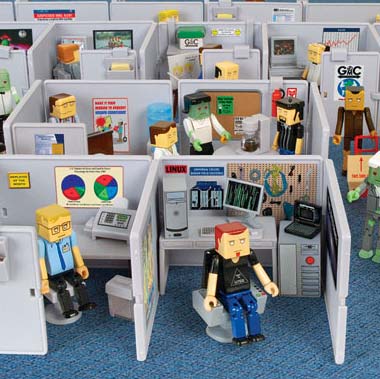
Fans of the The Office, The IT Crowd and Office Space will like this. Buy an army of employees and have them work in their cubicles for 8 hours straight and if you are in a really bad mood force them to work overtime.
In this office, you’re the boss!
Each set costs around $13. [Link]
note: check out the job title generator
This is a cool feature. It seems you can now make Google Images search for pictures of just faces. There isn’t a command available yet in the user interface but if you append &imgtype=face to the end of your search result url, it will filter the images and just display the ones that are of faces.
For example try these two links:
A search for images of Kuwait
https://images.google.com/images?q=kuwait
Same search for images of Kuwait but with the faces filter
https://images.google.com/images?q=kuwait&imgtype=face
Its slightly geeky but still cool. Check out this site for more details. [Link]
Categories
The Star Trek Wedding

I just found out Star Trek: The Experience has wedding packages. I could have gotten married on the bridge of the USS Enterprise and even had a Klingon and a BORG present!!! Sadly, I don’t think Nat would have agreed to it… [Link]
Categories
Buying Domain Names
A while back I posted about a good web space provider and today I decide d I would post about a good domain name provider. Although most hosts nowadays provide you with a free domain once you sign up, I for example have around 30 domains for a whole bunch of various sites of mine so I need a good domain provider where I could manage my domains and not pay an arm and a leg every time a domain renewal comes up.
For the longest time I had been using Directnic for my domain management and purchases. I started using them back in 2000 when they first launched. They were one of the first companies to offer domains for only $15 a year (before that domains cost a lot more). I never had any kind of problem with them but they also never really expanded their services. Six years later there are now many other sites that offer domains for much cheaper then $15 a year and with more features, so I decided to find another domain manager.
My first two options that came up were Joker.com and GoDaddy.com. For some reason I always had a negative impression about Joker plus they sell domains at 12$ a year while GoDaddy is $9 a year, so I went with GoDaddy. After transferring one domain name to them I realized GoDaddy really sucked. Their domain management interface was just awful and unintuitive. Not only that but whatever you wanted to do, buy a new domain name, transfer an old domain name, whatever you want to do they always seem to be trying to sell you stuff. I really hated how pushy they were.
I hated my experience with GoDaddy and I had only one domain there, I started looking for another domain provider and I found NameCheap. I have now been using NameCheap for a few months and I have transferred nearly all my domains there. The interface is fast, simple and practical to use. Their prices are also cheap, they sell domains for $8.88 and they have had this offer now for a couple of months where if you register or transfer a domain name they give you WhoisGuard for free. WhoisGuard keeps your domains anonymous which is pretty handy.
My experience with Directnic was great and I never had any bad experience with them. Customer service was always prompt and helpful but in the end of the day they weren’t offering me much for my money. The WhoisGuard option isn’t even available with them. GoDaddy was just a total diaster and I would never recommend them to anyone. NameCheap is now my new domain manager and I really like them a lot. I haven’t contacted customer service yet about any issues so I don’t know if that department is any good but everything else has just been working out flawlessly and the site is the quickest of the bunch to load. I would definitely recommend them.
Categories
Sony Ericsson Tip
Press the following combination of buttons:
> * < < * < *
> Right
< Left
* Astrix
If done correctly you should get the service menu where you can perform some nifty tests. It should work on every Sony Ericsson (and all the old Ericsson) phones.
Categories
XBMC – Xbox Media Center

I have been using XBMC for over a year now and I have yet to find a better alternative.
Here are some screenshots
https://jonsthoughtsoneverything.com/xbmc/
What I like about it:
1) easy to use, very practical
2) plays any video format you throw at it
3) for movie covers and info it connects to IMDB and downloads them. You get the movie dvd cover, cast info, movie plot, running time, IMDB rating and more.
4) connects to my macs itunes and photos
5) connects to internet radio stations, very nice interface
6) you can install scripts that allow it to do a multitude of things from connecting you to youtube to watching movie trailers on Apple. For examples go to https://www.xbmcscripts.com/
7) very useful weather section
8) allows you to connect to your xbox from any room using your computer..
9) you don’t need to install any software on your computer
10) when playing movies you have a ton of options including the very important audio syncing. say you download a movie with a messed up audio sync, you can slow down the audio or speed it up using xbmc
11) you can create bookmarks in movies. say you are half way through a movie and you need to leave, create a bookmark so you can come back to it later
12) you can customize or download different skins for xbmc although i like the default one
13) its very impressive when you show people over 300 album covers and you tell them you see all these movies? well you can watch any of them right now with a click of a button. it looks like the future basically.
14) very cheap to setup, all you need is an old xbox and the xbox remote

A very informative article on why old systems and specifically the SNES get discolored. I always figured it was something in the plastic and that light might also have something to do and turns out I was mostly right. [Link]