
 A few weeks ago as part of the Opera web browsers 10 year anniversary they had a special promotion where you could register the browser for free on that day. Seems like the promotion went better then they had expected because now they have gone ahead and made Opera free for good. Nokia users should be pleased. [Link]
Category: Apps
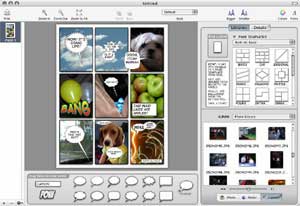
This is a cool mac app I just downloaded. The application is called Comic Life and allows you to easily create comics using your pictures and text. Its VERY EASY to use and has numerous options for a variety of layouts and balloons. I was easily able to create a stupid but really cool looking comic in like less then a minute since it automatically loaded up my iPhoto pictures automatically in the sidebar and allowed me to just drag and drop images into the layout. You can download it and try it and its only 4MB. [Link]
OK since Nibaq did his I figured I should also do mine. This is a list of my favorite and most used Mac Apps:
1) Firefox: I used to be a big fan of Camino until I started using the extensions in Firefox and since then I haven’t turned back. No other browser on the Mac gives me this much flexibility and upgrade-ablity like Firefox.
2) Butler: Used to be Quicksilver until a few days ago when Nibaq told me about Butler. Butler works like Quicksilver except its about twice as fast.
3) Xbench: Takes a benchmark of my Macs speed and then uploads it online. Been using it for a few years and I keep track on how fast or slow my Mac has become over time.
4) JBidWatcher: This free software has helped me win a lot of bids on eBay.
5) Zippist: Free and simple. Drag a file to the app and it Zips it.
6) Stuffit Deluxe: Probably the most used software on my Mac right after Firefox.
7) TextEdit: Loved NotePad on Windows, Love TextEdit on the Mac.
8) RadioLover: Don’t usually pay for software but paid for this. Its like Tivo for internet radio streams. Even goes as far separating each song the station plays as a separate MP3 file with full ID3 tags.
9) Data Rescue: Saved my ass twice so far. This software helps me recover deleted files.
10) SharePoints: Allows me to share my folders on the Mac with PCs on the network.
11) JunkMatcher: Best mail.app junk mail filter out there.
12) Serial Box: Ummm.. for research purposes…
13) Tomato Torrent: Stopped going to the movies because of this.
14) Extensis Suitcase: With all these fonts I have there is no better font manager available.
15) Acquisition: Finally, this is the only P2P software I use. I actually wanted to buy this but they only take paypal. Its that good.
 I just downloaded FireFox 1.5 (Beta 1) and first thing I noticed is that none of my extentions are compatible with it. Other then that FireFox still visually looks the same. I was expecting the icons maybe to be updated or something. The Prefrences control panel has changed, it now works like most other Mac apps. The browser seems a bit faster in loading up websites and actually FireFox 1.5 as a whole seems lighter and quicker. Sadly I will have to install the older version of FireFox again because I need my extensions. Here is the link to the FireFox 1.5 Beta 1 Start Page. [Link]

The new iTunes is really slick. I was so over the brushed metal look and I hope other brushed metal aps (like Safari and Quicktime) adapt this look. Everything new is so kick ass.

You need a dual-core processor system, with 2Gb or more of fast RAM, a 256Mb or better display card, a hard drive better than what’s currently available and, if we want to watch the upcoming high defininition multimedia content, a monitor that doesn’t even exist yet! [Link]
Categories
Oolite
Oolite is a space sim game, written for Mac OS X in Objective C using Cocoa and OpenGL. It is designed as a small game that is easy for users to pick up and expand upon. Almost every aspect of the game can be modified using simple, free graphics packages and text-editors. Oolite now works in Tiger. [Link]
Update: Although the idea behind this game sounded promising, after playing it or should I say trying to play it, this game is basically crap.
LEGO Digital Designer enables you to build and customize your own LEGO product. Now available for Macs & PCs. [Link]
Using Safari, Omniweb or Shiira? Feel like crashing the browser?
Then click here!

[via]
Categories
Info on Your Apple Laptop Battery
This is a really cool software called coconutBattery and I can’t wait to use it on Nat’s PowerBook once I get home. This software gives you a whole bunch of details about the laptops battery including how much charge it originally held and how much it holds now. Nat’s battery is pretty messed up, in OS X it says her battery would last for 26 more hours when in reallity its more like 26 minutes. [Link]
My favorite mail.app anti-spam tool just got better. With their most recent update, JunkMatcher can now integrate with SpamBayes! [Link]
Categories
Install OS X on Intel PC’s
Yesterday Tivo-Guy messaged me telling me he was able to install and run OS X Tiger on one of his machines at home. Tivo-Guy unlike us regular geeks is a Super Geek who can turn a kitchen blender into a computer if he wanted to. So I decided to share a link on how to setup OSX to work on your PC in a language us regular geeks can understand. [Link]
I found this via BoingBoing, the software is called DTV and I downloaded it and tried it and basically its like Pod Casts except with video. Currently its only available for Macs but PC version coming out soon. [Link]
Categories
PSP Software Version 2.0
Where the fuck are you damn it!! [Link]