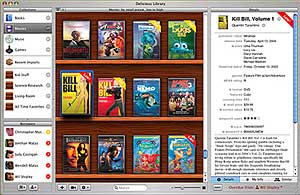
I have a lot of CDs, Videogames and Books and it has always been a dream of mine that I could organize them in some sort of catalog so I could keep track of what I have. I believe I finally found what I have been looking for all my life, Delicious Library.
Delicious Library is a software for the Mac that allows you to organize your stuff very easily. There are various ways you could add stuff to the library, at the moment I am entering the bar code numbers manually and the software automatically searches various sources online and then returns with a whole bunch of info on the product I just entered. Current prices, reviews, ratings, album cover, and a ton more info just by entering the bar code. If you have iSight or any other firewire camera you don’t even have to manually type the bar code numbers, just take the bar code and place it in front of the camera and it will automatically scan it just like the supermarket people use the bar code scanners. If you are lucky enough to have a bar code scanner (cuecat owners click here) you could also use it to input information into Delicious Library. You could even add stuff by typing in the CD or book titles, for example I typed in Blind Melon Soup and it returned 2 results, I clicked on the right one and thats it, its automatically added into my library.
After you add all your items to the catalog you can then search for songs, artists, authors, publishers etc.. you can even have it print out the whole catalog for you with all your items listed. You can add notes under each item also for example the name of the person you lent the item to and even find items similar to one you have highlighted.
Delicious Library isn’t free though, it costs $40 but its worth it. So make sure you check it out. [Link]
Note: If you are interested in a cuecat modified to read barcodes, you can find them on Amazon for only $9.99. [Link]
Note 2: If you are a PC user there is a software called Readerware that supposedly does the same thing except not as pretty looking. [Link]
 A few weeks ago as part of the Opera web browsers 10 year anniversary they had a special promotion where you could register the browser for free on that day. Seems like the promotion went better then they had expected because now they have gone ahead and made Opera free for good. Nokia users should be pleased. [
 I just downloaded FireFox 1.5 (Beta 1) and first thing I noticed is that none of my extentions are compatible with it. Other then that FireFox still visually looks the same. I was expecting the icons maybe to be updated or something. The Prefrences control panel has changed, it now works like most other Mac apps. The browser seems a bit faster in loading up websites and actually FireFox 1.5 as a whole seems lighter and quicker. Sadly I will have to install the older version of FireFox again because I need my extensions. Here is the link to the FireFox 1.5 Beta 1 Start Page. [