
Categories
Geek Reviews

Review: Harmony 880 Remote

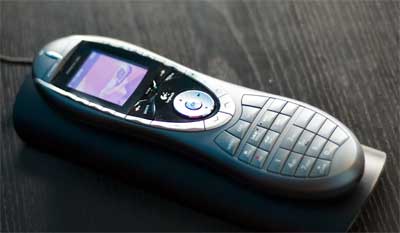
harmony 880

For nearly a year now I was using my Sony AV3000 universal remote to control my living room setup made up of a TV, DVD player, Xbox, AV Receiver and Tivo. Instead of having multiple remotes spread out over my table the idea was to replace them all with one device. This idea failed since although my Sony universal remote was great, it wasn’t as practical as the Tivo or Xbox remote. So I mostly used the Sony remote to control my TV, DVD player and AV Receiver but continued using my original Tivo remote (which many say is the best remote design ever) to control my Tivo and the original Xbox remote to control my Xbox.

A few months back a friend of mine Rami ordered the Harmony 880 remote. He had been a Harmony user long before Logitech acquired them and as soon as the 880 was released he placed an order for one. He kept telling me how great the Harmony remotes were and how the new 880 was just really the best remote he had ever had. Finally I decided to order one and I got it last week. I have to say Rami was right, this is one of the best remotes I have ever had!

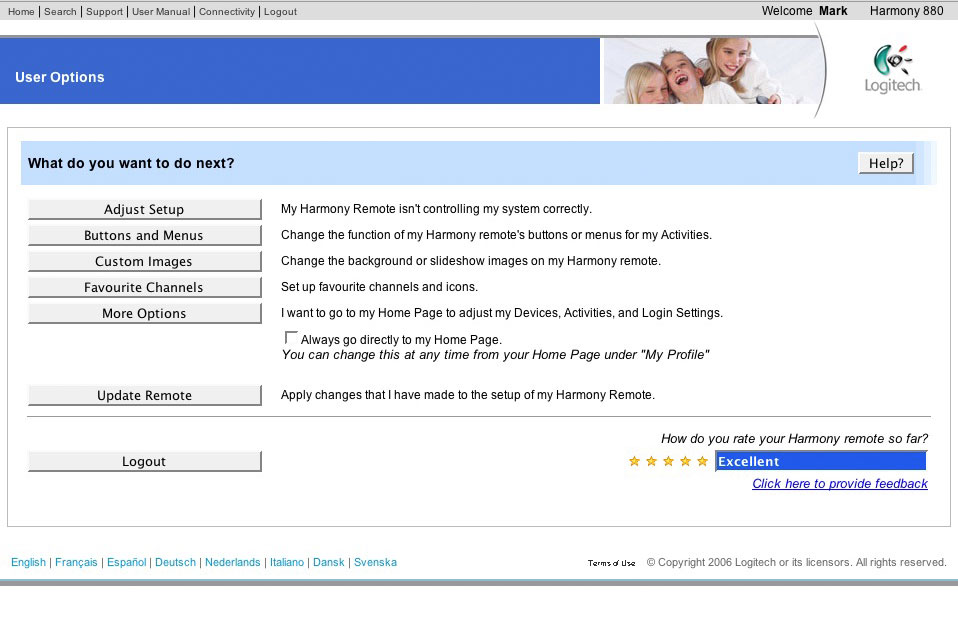
The Harmony 880 is a universal remote on steroids. It has a number of impressive features the most important being the colored screen and the fact it uses rechargeable Li-on batteries which you can charge by placing the remote on the dock it came with. To setup the remote you need to create an account on the Harmony website and then transfer the date to your remote using the included USB cable. I don’t know why they did it like that since I would have preferred having a local software on my computer to control my remote from. If you don’t have Internet then the 880 remote would be useless for you since you NEED to have an Internet connection to set it up the first time.

The colored screen on the remote is a really cool feature but the quality is similar to older mobile phone screens like the Sony Ericsson T68i. Setting up the remote online was a breeze and using the Activities button I was easily able to enjoy watching TV right away. The Activities button allows you to tell the remote what you want to do. Do you want to watch a DVD? Click on the “Watch DVD” button and the remote will turn on the DVD player, AV receiver and TV for you, it will then put the TV on the right channel and choose the correct input on the AV receiver. Want to watch Tivo? Click on the “Watch Tivo” button and the remote will turn the TV on, put it on Video 2 and then turn the AV receiver on and change the input to AUX. All this with a click of a button. Although things look simple, for hardcore users you have a whole amount of detailed control underneath this easy to use interface. How long does your TV take to warm up before it would accept commands? 2 seconds? You can teach the remote that. Do you want to change the on screen icons to your own design? You can do that. This remote is just loaded with a ton of features like that, little but important stuff for people who want more control.
The most important deciding factor in a good remote is its ergonomics. How does the remote feel in the hand? How easy is it to use? Is it practical? Well the Harmony 880 remote feels like the Tivo remote with the main important controls located in the middle while other lesser used controls are spread out on top and bottom. The 880 has a motion sensor so when you pick up the remote it automatically lights up the screen and all the buttons.. no more fumbling around in the dark trying to find the pause button. I wouldn’t say the 880 is better ergonomically then the Tivo remote but it really is very close to being as good. I mean, I have stopped using both my Tivo and Xbox remotes in favor of the 880.

I could go on and on in more details about why this remote is THE remote to own but there are tons of other reviews online that do that. I just want to back up all these reviews and say that everything you read about this remote is true. I love it, it looks good, its easy to use and hold, its fully featured and it allows me to do so much. I couldn’t believe it when this remote gave me features my original TV remote didn’t have! The only negative thing about the remote is the fact that you have to use their website to set it up. Maybe under usual circumstances its not a big deal but since I have been having Internet problems at home I am forced to take my remote with my laptop to starbucks or work and set it up from there. Not very practical and this is why this perfect remote will get 4 stars and not 5.

Buy the Harmony 880 from Amazon for $224

Update: If I had to review the remote again I would give is a 2.5 out of 5 because I am having a lot of problems with Harmony’s web based software. Their servers are slow and I am getting a lot of time out errors everytime I need to change an option on the remote.



Categories
Apple Geek

Sony Ericsson K700/K750, GPRS and Macs

Finally got my Mac to connect to my phones GPRS connection. I spent like 30 minutes now trying everything and for a while I thought it must be because both my PowerMac and Nats Powerbook are running OS10.4 but then when I tried it on my clamshell iBook which was running OS10.3 it still didn’t work. After a bit of playing around I found the solution and decided to post it here incase someone in the future does a google search looking for help.

If you have a Sony Ericsson K700 or K750 and are trying to get you Apple computer to connect to your phones GPRS connection using bluetooth, when choosing modem type choose “Ericsson R520 28.8”. I was getting a “No carrier detected” error message while using the default “Ericsson Infrared” selection for the modem which used to work perfectly fine with my older Sony Ericssons T610 and T630.


Categories
Geek

Imation Flash Wristband

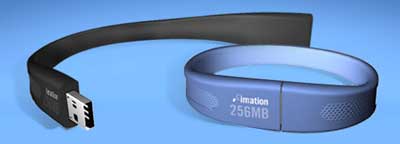
imation wristband

I am not a wristband type of guy, the only thing I wear on my wrist is my watch.. I don’t even wear any jewelery other then my wedding ring. Things might change though now that I have discovered what must be the most practical fashion accessory out there.. the Imation Flash Wristband. Its a flash stick which you simply wear around your wrist, how simple of an idea is that? It also doesn’t look bad at all just maybe a bit geeky. I couldn’t find the price but it was supposed to have been released mid January at Target stores. I checked the online Target store but I couldn’t find it and I couldn’t find on either Newegg.com or Amazon.com. [Link]


Categories
Apple Geek Information

How easy is it to replace an optical drive on an Apple Powerbook?

The answer.. not easy at all! You basically have to take apart the whole Powerbook just to replace the drive. Check out the step by step guide, it just gets freakier and freakier the nearer you get to the end.

I was thinking of replacing my sisters non-working drive myself, but after seeing this guide, there is no way I am even going to try doing it. [Link]


Categories
Geek Kuwait Technology

Tivo Kuwait

TivoKuwait.com is up and running with lots of juciy info on getting Tivo running in Kuwait. The site is run by Tivo Guy, Rami. [Link]


Categories
Geek Internet

Rotana Hotel Bug

Just found a bug in the Internet connection here, kinda like the one Zajil had in Kuwait. Basically I log in using my internet card, I sign onto MSN and then logout from the internet. The MSN connection stays open. Pretty cool.


Categories
Geek Video Games

Pictures of Video Game Controllers

A large collection of pictures of video game controllers and joysticks. My favorite is the Coleco controller of course. [Link]


Categories
Geek Video Games

Perfect Dark Perfect in the Dark

Only video game fans will get this comic strip. I love Killer Instinct by the way.. even though I was never able to perform the 80+ combo moves. My dream would be to buy a Killer Instinc arcade machine and shove it in my living room. Only place in Kuwait I know of that still has the Killer Instinct arcade is Showbiz on the seaside. [Link]


Categories
Geek Kuwait Shopping Technology

HDTV at Al Ghanim

I passed by Al Ghanim Electronics tonight to check out their HDTVs. They had a whole bunch of plasmas on display but none grabbed my interest, I was there looking for regular (tube/crt) high definition television. Turns out they only had 1 which supported the 720p resolution and it was the 36″ Sony which a regular reader (hola) pointed out to me was on sale for KD590 because it was the last piece. Sadly its widescreen which won’t fit in my display and also I was looking for a regular 4:3 ration TV not the 16:9. They had 2 other Philips TVs which supported HD and were pretty cheap BUT neither of them supported the high resolution 720p, just the low res 420p and 1080i. The 34inch was for like KD300 while the 29″ for like KD200.

So if anyone is interested in the Sony 36″ HDTV, its selling for an amazing low price (actual price is around KD800) and they only have 1 display model left.


Categories
Geek Kuwait Technology

HDTV in Kuwait

Well the Xbox360 is coming out in a few days and its time to move onto the next generation of videogame consoles. I have been reading most of the Xbox reviews online and I have concluded one thing, I need a High Definition Television. The majority of the reviews I have been reading have been saying that unless I have a HDTV I won’t be seeing much of an improvement over the current generation of consoles. So it seems the wise thing to do is to upgrade my TV which I have been wanting to for a while now. I don’t want to get a plasma/LCD TV for numerour reasons including the fact that the only plasma I can afford are the cheap Panasonic Viera series which are currently being advertised on billboards around Kuwait. The problem with the Viera is you get what you pay for and according to online reviews the Viera series have numerous issues with the most important one being they doen’t support the 720p resolution. I also believe that a high definition tube television would give a better picture quality then the plasmas and LCDs, so until OLED TVs get released I will be sticking with the old tube.

This is where the problem starts, I haven’t found many HD tube televisions in Kuwait. I only found two models at Sony, a 29″ and a 34″ and I haven’t found any other anywhere else. The 34″ seems like my best option at the moment but it costs around KD700-KD800 which brings me to the following question, is it worth getting HDTV in Kuwait?

In the States they already have cable and satellite channels broadcasting at High Definition, from what I know we don’t have anything like that in Kuwait. So paying KD800 for a TV so I can play high definition games on it doesn’t make a lot of sense. DVD’s are supposed to look better on HDTV’s but I don’t buy that many DVD’s and I mostly use my TV for watching TV shows.

So any HDTV experts here? Any tips and advice in purchasing a HDTV and using it here in Kuwait?


Categories
Geek

Digg Exploit

Wow, took him 50 minutes to hit the main page with it. View the source. [Link]

update: they pulled him off the main page now.


Categories
Apple Apps Geek Kuwait Personal

Update on my iBook

ibook clamshell osx

Last month I purchased an old 300mhz Apple clamshell iBook. It had 32MB of RAM and was running OS 9.2 slowly. So I ordered a Kingston 256MB RAM stick for my iBook and it arrived earlier in the week. The first thing I did once I installed it was to replace OS 9.2 with Linux. The reason simply was I needed to be able to browse on the iBook and Firefox wasn’t available for OS 9.2 and I had heard OS X would run very slow on my Mac. So Linux was my only option and after over 1 hour of installing the OS I tried it out and was very disappointed. Although it was very responsive and it did have Firefox, I wasn’t very comfortable using it and I decided to give OS X a shot. If OS X turned out to be very slow then I would come back to Linux as my last option.

I formated the drives and proceeded to install Panther (OS 10.3) onto my ibook. Installation was brisk and in less then 30 minutes it was done installing and rebooting. When the OS launched again I played around with it a bit and I was shocked. Panther was pretty responsive and very very usable. It was not slow, there was no lag and I wasn’t even bothered by the 800×600 screen resolution. I was simply amazed at how well everything was running. I quickly copied Firefox and Adium from my main mac at home and proceeded to set things up importing my bookmarks and setting up my system preferences, everything ran extremely smooth and I even managed to install OS 9.2 in case I ever needed it.

After a week of using my iBook it has finally become my main Internet browsing portal. I am getting online from my living room while watching TV and I am really enjoying it. Sure I could be surfing from the living room with Nat’s powerbook but its not mine and even when I setup my own account on her powerbook it still always felt as if I was using HER powerbook. My previous Internet portal in the living room was my Audrey and I think I will have to find another place for it (maybe the bathroom) since because of my iBook I am no longer using it. This iBook is mine and I feel right at home with it… until the next generation of iBooks get released. So far its great and I even am posting from it right now. So in conclusion a Mac capable of running OSX smoothly cost me KD25 ($85) for the iBook and KD12 ($40) for the RAM. Unbelievable fucking cheap!


Categories
Geek Information Interesting

History’s Worst Software Bugs

Wired has a very cool and informative article on the worst software bugs in history. Some really interesting stuff. [Link]


Categories
Geek Links

Torrent Finder

Torrent Finder is a Torrent Search Engine which searchs top torrent sites from one page. Very practical. [Link]

[via]


Categories
Geek Shopping

WIRED STORE

wired store

My favorite magazine has opened their first ever store although its temporary until Christmas. From November 18th to December 24th you will be able to visit the WIRED STORE in Soho, New York City and “geek out in style”. More info after the jump. [Link]