Originally I was planning to write a small post on my experience with the Synology backup drive and maybe compare it to my Drobo but in all honesty, the thing turned out to be a lot more than just a simple backup drive and so the tiny post has turned into a much bigger one.

Synology DS1511+ Web Interface
Firstly a quick brief about what the Synology DS1511+ is. In it’s most simplest form it’s an external backup hard drive that can take up to five 3TB hard drives and has data protection which means if one of the five hard drives fail my data is still protected. But the DS1511+ (from here on I’ll just call it the Synology) is also a mini server and so doesn’t require to be connected to a computer.
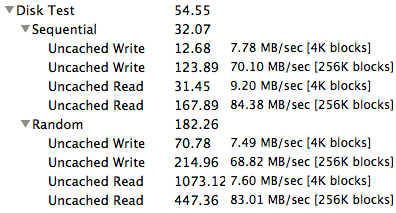
Xbench disk test
Performance wise the Synology turned out to be a lot faster than my Drobo. How fast? Copying a 2.48GB file from my computer over FireWire 800 to the Drobo took 4 minutes and 30 seconds. Copying the exact same file over gigabit ethernet to the Synology took just 42 seconds. That’s over 10 6 times as fast!
So yeah if you’re looking for a backup drive to put all your important files onto it and still have your data protected in case the drive fails, the Synology is great. But, the Synology is also more complicated to setup than the Drobo. Cost wise they’re selling the Synology drives in Kuwait for cheaper than Amazon and you can find them at either Blink (where I got mine from) or Cameo. Cameo also has the newer but slightly more expensive DS1512+.
Now that I got all that out of the way this second part is what REALLY makes the Synology cool. Continue below for the second part of this review.