Categories
Apple Geek

I couldn’t unlock iPhone with firmware 1.1.1

iphones

A friend of mine passed me his two iPhones today to unlock. He purchased them around the same time I purchased my last iPhone except his arrived with the 1.1.1 firmware while mine luckily arrived with the 1.0.2 one. Yesterday an updated version of AnySIM got released which I posted about and which supposedly unlocked the 1.1.1 iPhones but I tried it and it didn’t work.

The steps to unlocking a 1.1.1 iPhone are fairly easy, its just one tiny extra step compared to unlocking the 1.0.2 phones.

1) I downloaded the latest version of INdependence
2) I ran it and clicked on the option to Enter DFU mode (this is the option that you didn’t have to do with 1.0.2)
3) I quit INdependence, ran iTunes and restored the phone to version 1.0.2
4) I quit iTunes and ran INdependence again
5) I clicked on Activate
6) I then clicked on Jailbreak
7) I then clicked on install SSH
8) I FTP’ed to the phone and copied AnySIM
9) I ran AnySIM

Thats all the steps required to activate and unlock the iPhone. I also installed AppTapp but that can be done later. Now my issue is everything went smoothly except for the AnySIM unlock. It ran and gave me an error at the end which is normal, but when I rebooted it still wouldn’t work with the local GSM network. I tried unlocking both iPhones and had the same issue. Everything else on the iPhone works except for the phone. I don’t know if this is happening with other people or if I missed a step somewhere but whatever the reason might be it’s too late at night to figure it out.


Categories
Geek Personal Video Games

Call of Duty 4 Demo

call of duty 4

Just wanted to boast to other video gamers that I am currently downloading the Call of Duty 4 Multiplayer Beta for the Xbox 360. Since I am a gamespot.com member I was given an activation key for the download. Gamespot rules! [Link]


Categories
Blog Info Geek Information

How I will be moblogging

Nokia e61i

This post is a bit technical but its meant to be a small guide for bloggers who want to post using their phones.

The past two days I have been experimenting with different softwares and ways of moblogging. The easiest way I found to moblog was with a software for my Nokia called Shozu. It’s very easy to use, I just take a picture and a small window pops up asking me if I want to send it to my blog. I could then click yes and it sends it or I click on more options and add more details like a subject title and body copy. But I had two problems with Shozu. The first one is the fact that it resized my images down to a thumbnail size and you could only see the larger picture by clicking on the link. I didn’t like that and there was no option to change it. The second problem I had was that since the software is free, Shozu places their logo at the end of your posts. I also didn’t like that, they should at least have an option where if you pay for the software they remove the logo but they don’t so I looked for an alternative.

After a bit of experimentation and googling I found a better solution (for me at least). It’s not as practical as Shozu but I am in total control of everything. I decided to go with the Blog by Email route and here is what I did:

1) Created two new email accounts
2) Got a plugin for wordpress called Postie
3) Got a software for my Nokia called Resco Viewer

I setup one email account on my Nokia to send emails from. The second email account would be the one I would send my posts to. I then installed the Postie plugin in WordPress which is a must have plugin if you are planning to blog by email. Firstly, Postie allows u to attach pictures and videos to your emails and then posts them for you. it also gives you a lot of other options for example Postie has an option where it could palce the image above or below the body copy, I chose above so it would match my regular posts. Postie could also resize your images and compress them before it posts them which is really important if you can’t resize images on your phone. Finally I purchased the software Resco Viewer for my Nokia. With my phones camera I have two size options when it comes to taking pictures, 1600×1200 and 640×480. The max size for images on my blog is 400 pixels wide. If I wanted to I could take pictures at 640×480 and have Postie resize them for me but by resizing the pictures myself on the phone and compressing the images slightly, the file sizes would be a lot small meaning it would be cheaper for me since I pay per kilobyte.

So the process now goes something like this:
1) I take a picture on my phone at 1600×1200 pixels
2) I resize the image to 400×300 and compress it
3) I send an email to my blog and attach the resized image
4) Postie checks my email constantly, when it finds an email it posts it on the blog under the category Moblogging

Now the biggest problem is my phone doesn’t have a spell checker to expect a ton of misspellings. So thats basically how I will be moblogging while in Paris. I will continue to post regular posts but the photo ones are meant to be something new and something I haven’t done on this blog yet. It should prove to be entertaining.


Categories
Funny Geek Toys

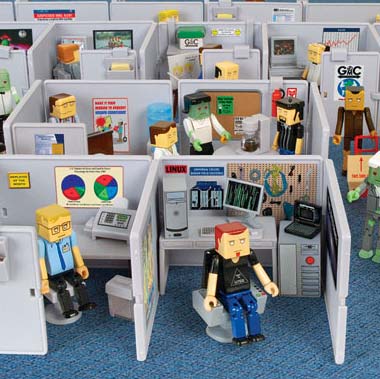
The Cubes

the cubes

Fans of the The Office, The IT Crowd and Office Space will like this. Buy an army of employees and have them work in their cubicles for 8 hours straight and if you are in a really bad mood force them to work overtime.

In this office, you’re the boss!

Each set costs around $13. [Link]

note:
check out the job title generator


Categories
Geek Information Photography

Google Images Quietly Adds Face Filter

This is a cool feature. It seems you can now make Google Images search for pictures of just faces. There isn’t a command available yet in the user interface but if you append &imgtype=face to the end of your search result url, it will filter the images and just display the ones that are of faces.

For example try these two links:

A search for images of Kuwait
https://images.google.com/images?q=kuwait

Same search for images of Kuwait but with the faces filter
https://images.google.com/images?q=kuwait&imgtype=face

Its slightly geeky but still cool. Check out this site for more details. [Link]


Categories
Geek

The Star Trek Wedding

star trek wedding

I just found out Star Trek: The Experience has wedding packages. I could have gotten married on the bridge of the USS Enterprise and even had a Klingon and a BORG present!!! Sadly, I don’t think Nat would have agreed to it… [Link]


Categories
Geek Information Internet Personal

Buying Domain Names

A while back I posted about a good web space provider and today I decide d I would post about a good domain name provider. Although most hosts nowadays provide you with a free domain once you sign up, I for example have around 30 domains for a whole bunch of various sites of mine so I need a good domain provider where I could manage my domains and not pay an arm and a leg every time a domain renewal comes up.

For the longest time I had been using Directnic for my domain management and purchases. I started using them back in 2000 when they first launched. They were one of the first companies to offer domains for only $15 a year (before that domains cost a lot more). I never had any kind of problem with them but they also never really expanded their services. Six years later there are now many other sites that offer domains for much cheaper then $15 a year and with more features, so I decided to find another domain manager.

My first two options that came up were Joker.com and GoDaddy.com. For some reason I always had a negative impression about Joker plus they sell domains at 12$ a year while GoDaddy is $9 a year, so I went with GoDaddy. After transferring one domain name to them I realized GoDaddy really sucked. Their domain management interface was just awful and unintuitive. Not only that but whatever you wanted to do, buy a new domain name, transfer an old domain name, whatever you want to do they always seem to be trying to sell you stuff. I really hated how pushy they were.

I hated my experience with GoDaddy and I had only one domain there, I started looking for another domain provider and I found NameCheap. I have now been using NameCheap for a few months and I have transferred nearly all my domains there. The interface is fast, simple and practical to use. Their prices are also cheap, they sell domains for $8.88 and they have had this offer now for a couple of months where if you register or transfer a domain name they give you WhoisGuard for free. WhoisGuard keeps your domains anonymous which is pretty handy.

My experience with Directnic was great and I never had any bad experience with them. Customer service was always prompt and helpful but in the end of the day they weren’t offering me much for my money. The WhoisGuard option isn’t even available with them. GoDaddy was just a total diaster and I would never recommend them to anyone. NameCheap is now my new domain manager and I really like them a lot. I haven’t contacted customer service yet about any issues so I don’t know if that department is any good but everything else has just been working out flawlessly and the site is the quickest of the bunch to load. I would definitely recommend them.


Categories
Geek

Sony Ericsson Tip

Press the following combination of buttons:

> * < < * < *

> Right
< Left * Astrix If done correctly you should get the service menu where you can perform some nifty tests. It should work on every Sony Ericsson (and all the old Ericsson) phones.


Categories
Apps Geek Personal Technology

XBMC – Xbox Media Center

xbmc

I have been using XBMC for over a year now and I have yet to find a better alternative.

Here are some screenshots
https://jonsthoughtsoneverything.com/xbmc/

What I like about it:

1) easy to use, very practical
2) plays any video format you throw at it
3) for movie covers and info it connects to IMDB and downloads them. You get the movie dvd cover, cast info, movie plot, running time, IMDB rating and more.
4) connects to my macs itunes and photos
5) connects to internet radio stations, very nice interface
6) you can install scripts that allow it to do a multitude of things from connecting you to youtube to watching movie trailers on Apple. For examples go to https://www.xbmcscripts.com/
7) very useful weather section
8) allows you to connect to your xbox from any room using your computer..
9) you don’t need to install any software on your computer
10) when playing movies you have a ton of options including the very important audio syncing. say you download a movie with a messed up audio sync, you can slow down the audio or speed it up using xbmc
11) you can create bookmarks in movies. say you are half way through a movie and you need to leave, create a bookmark so you can come back to it later
12) you can customize or download different skins for xbmc although i like the default one
13) its very impressive when you show people over 300 album covers and you tell them you see all these movies? well you can watch any of them right now with a click of a button. it looks like the future basically.
14) very cheap to setup, all you need is an old xbox and the xbox remote

www.xboxmediacenter.com


Categories
Geek Video Games

Why Super Nintendos Lose Their Color: Plastic Discoloration in Classic Machines

snes discoloration

A very informative article on why old systems and specifically the SNES get discolored. I always figured it was something in the plastic and that light might also have something to do and turns out I was mostly right. [Link]


Categories
Geek Internet Kuwait

Wataniya W-Net High-Speed Internet

wnet

I am going to start off by saying I am not a fan of Wataniya. I have been an MTC user since 1995 and I am very loyal to the brand. So, when I was contacted by Wataniya to try out their new W-net internet router I wasn’t very thrilled because I would rather it had been MTC calling me. But I still went ahead and met with the Wataniya guy who turned out to be cool and a Nintendo Wii fan and he explained to me what W-net was and told me that Wataniya had hooked me up with a 6 month prepaid subscription. I was thinking worst case scenario if the connection turned out to be crap I could take the router to work and hook it up over there since my office lacked a wifi connection which annoys the hell out of me whenever I take my Macbook to work. After using the device for over 2 weeks I can say I am impressed.

When I first opened the package I found the Quick Start Guide which involved 11 steps on how to setup the connection. I ignored the guide, turned on the router and connected to it via wifi on my Macbook. Thats it, I was connected to the Internet. Its a lot easier then 11 steps.

The Wataniya router works on the HSDPA network which is a 3G mobile protocol. Currently 3G isn’t covered everywhere in Kuwait so if you don’t have 3G in your area you will end up connecting onto the much slower EDGE network. So if you want to take full advantage of W-net you better hope you live in a 3G zone. I live in Salmiya and I have 3G here.

The most impressive thing about the W-Net connection is the download speed. I have a 512 DSL connection by Qualitynet and I usually download files at around 63 KB/sec. With W-net on the other hand I download at around 107 KB/sec which is nearly twice as fast as my DSL connection. The upload speed is slow though at around 15 KB/sec where as my Qualitynet hits around 35 KB/sec.

wnet

Loading websites feels slower on the Wataniya connection. When I type in a URL its always quicker to load on my Qualitynet connection. I thought it was because of the connection latency but I pinged mark248am1.wpenginepowered.com on both my Qualitynet connection and the Wataniya connection and the results were very close so I don’t know why the lack of acceleration.

Qualitynet
PING mark248am1.wpenginepowered.com (66.199.240.42): 56 data bytes
64 bytes from 66.199.240.42: icmp_seq=0 ttl=45 time=321.393 ms
64 bytes from 66.199.240.42: icmp_seq=1 ttl=47 time=305.564 ms
64 bytes from 66.199.240.42: icmp_seq=2 ttl=45 time=325.444 ms
64 bytes from 66.199.240.42: icmp_seq=3 ttl=45 time=356.846 ms
64 bytes from 66.199.240.42: icmp_seq=4 ttl=45 time=376.722 ms

Wataniya W-Net
PING mark248am1.wpenginepowered.com (66.199.240.42): 56 data bytes
64 bytes from 66.199.240.42: icmp_seq=0 ttl=45 time=306.380 ms
64 bytes from 66.199.240.42: icmp_seq=1 ttl=47 time=327.925 ms
64 bytes from 66.199.240.42: icmp_seq=2 ttl=45 time=383.964 ms
64 bytes from 66.199.240.42: icmp_seq=3 ttl=45 time=295.931 ms
64 bytes from 66.199.240.42: icmp_seq=4 ttl=45 time=472.001 ms

For the geek users, you can customize the settings of the router to your liking just as if it was an ordinary router. It originally came set with the IP address 192.168.1.1 but my network runs on 192.168.0.X so I just logged in to the router settings and just changed stuff like turning of DHCP and changing the routers name. The router has an Ethernet port so you can connect it to the regular network or directly to your computer in case you don’t have wifi.

The price of the router plus Wataniya data line is KD135. The monthly charge for the connection is KD28, or KD300 for 1 year and KD565 for 2. I don’t know if you can order a different cheaper router off the web and use it with the Wataniya data line, I guess it could work.

Would I give up my DSL connection for W-Net? No I wouldn’t. I upload a lot of stuff all the time and 35 KB/sec is slow for me yet alone 15. I also browse the web a lot and like it when pages load instantly. The W-Net connection reminds me of my previous Shownet connection (which was Satellite based). It has a high top speed but slow acceleration meaning when browsing websites you don’t really feel the connection is fast only when you start downloading files do you notice it.

Would I recommend the W-Net connection? Yes in certain situations. For example in my old place in Salwa I couldn’t get a DSL line setup because the phone network in my street didn’t support it. My only option was a Satellite/Dialup combo which sucked. If I was still living there then I would definitely get W-net. Also for people who can’t get phone lines for one reason or another or for people who simply want an Internet connection wherever they go (camping, challet, anywhere with a power outlet) then this would also be a good option.

Am I going to take the router to the office? Nope, whenever I have files to download I just switch over to the W-Net connection and download them. Its really convenient having it because its cutting my download time in half. Anyway if you have any questions regarding W-Net just leave a comment below and I will try to answer it.

www.wataniya.com



Categories
Geek Kuwait

Blogger Meetup

dunkin donuts kuwait

There will be a blogger meetup tomorrow at 5:30 since its the first Thursday of the month. The difference this month from other months is the meeting will be held at Dunkin Donuts in Salmiya. Thats a much cooler venue then the previous one which was Second Cup in Kuwait City plus its a lot closer to my house. Whoever changed the location a big thank you! I haven’t been to a bloggers meetup yet but I will tomorrow.


Categories
Geek Internet Kuwait Technology

Wataniya W-Net

wnet

Today I met with a person from Wataniya. They wanted me to try out their new W-Net router based system so they hooked me up with a device and a 6 month subscription plan.

wataniya wnet

It runs on the HDSPA network and right out of the box on a busy Thursday night I am downloading at 51.6kb. I will post more pictures and details after I play with it some more this weekend. So far this Internet connection seems as fast as my Qualitynet 512 DSL connection.


Categories
Geek

How to crack Photoshop CS3 Beta

I have been using Adobe Photoshop CS3 for a couple of months now and its fucking amazing. Its wayyy better then CS2. If you are looking for the Adobe Photoshop CS3 crack which I had posted here well its not here anymore. I am sorry but the crack has been removed.


Categories
Design Food & Drinks Fun Geek

Make A Cylon Jack-O-Lantern

Cylon

Wow, if I had the free time I would definitely attempt making this. I don’t think I have ever seen a cooler Halloween pumpkin. [Link]